Is Public WiFi Safe? What I Learned in the Philippines
Is public WiFi safe?
That’s the question I found myself asking this morning when my internet was cut off and I had to rely on public WiFi in the Philippines. What I realized is something most people don’t think about — and it could expose more than you expect.
This morning, I ran into a problem.
My internet was cut off.
I had forgotten to pay the bill — and since I start working around 5:00 AM, there was no way to fix it right away.
I needed internet immediately.
So I did what a lot of people here in the Philippines do.
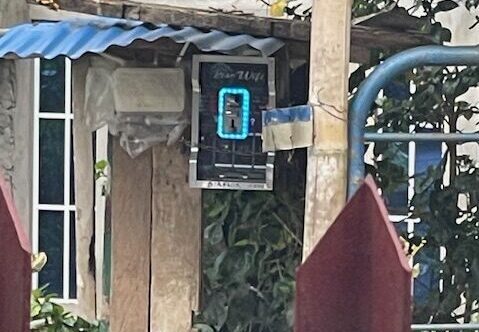
I walked across the street to a small neighborhood store — a sari-sari store — and paid 10 pesos to connect to a coin-operated Wi-Fi box.
Within seconds, I was back online.
But there was one problem.
👉 I was now on public Wi-Fi.
And public Wi-Fi is one of the easiest ways for attackers to access your data.
What Most People Don’t Realize About Public Wi-Fi
Public Wi-Fi feels safe.
It’s everywhere:
- Coffee shops
- Airports
- Hotels
- Small neighborhood networks like this
But what most people don’t realize is:
👉 Anyone on the same network can potentially monitor traffic
That includes:
- Login activity
- Unencrypted data
- Account access attempts
If you’ve ever logged into email, banking, or apps on public Wi-Fi…
👉 this matters.
For a deeper breakdown of how this fits into your overall protection, see:
👉 The 5 Layers of Online Security Most People Ignore
https://securewithvpn.com/the-5-layers-of-online-security/
What I Did Before Logging Into Anything
Before I opened email…
Before I checked accounts…
Before I did anything important…
👉 I turned on my VPN.
I use:
👉 NordVPN
Once connected:
- My internet traffic was encrypted
- My data was hidden from others on the network
- My connection became significantly safer
Without a VPN vs With a VPN
Without protection:
👉 Using public Wi-Fi is like sending postcards through the mail
Anyone along the way could read them
With a VPN:
👉 Your connection is encrypted
👉 Your data is protected
👉 Your activity is hidden
Public Wi-Fi Isn’t the Only Risk
Network security is just one part of staying protected.
If you want full protection, you need layers.
For example:
👉 Weak passwords → accounts get taken over
👉 Infected devices → data gets exposed
👉 Poor recovery settings → accounts get locked
If you’ve ever wondered how accounts actually get taken over, read:
👉 How Hackers Take Over Email Accounts
https://securewithvpn.com/how-hackers-take-over-email-accounts/
The Simple System I Follow (5 Layers)
Security doesn’t need to be complicated.
Here’s the system I follow:
1. Identity Protection
- Strong, unique passwords
- 2FA enabled
2. Device Protection
👉 Bitdefender Total Security
https://bitdefender.f9tmep.net/c/6963914/2999423/4466
- Blocks malware
- Detects suspicious behavior
- Protects sensitive data
3. Network Protection
👉 VPN (especially on public Wi-Fi)
4. Financial Awareness
- Monitor accounts
- Avoid unknown links
- Never send money impulsively
5. Behavior Awareness
- Watch for urgency
- Never share codes
- Question everything
The Reality About Public Wi-Fi
That small Wi-Fi box worked perfectly.
But only because I secured my connection first.
Without protection, I could have:
- Exposed login credentials
- Risked financial account access
- Opened the door to account takeover
👉 All from a simple internet connection
The Habit That Protects You Everywhere
Public Wi-Fi is unavoidable.
But risk is optional.
👉 Using a VPN turns:
Risky public Wi-Fi
into
Safer public Wi-Fi
And it takes seconds.
Want a Simple Step-by-Step Setup?
If you want a calm, simple way to secure:
- Phone
- Financial apps
- Public Wi-Fi
👉 Download the free guide here:
https://securewithvpn.com/free-online-security-guide/
No hype. No fear tactics.
Just practical protection.